Posts

Microsoft Dynamics Ax Views
Image
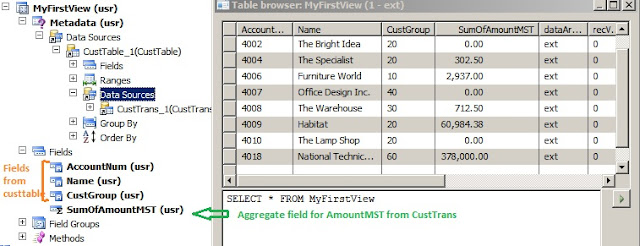
Views are used to make extraction of data easier. A view is the result of an inner join of two or   more tables. Views are read only and support aggregated functions on the fetched data. In a relational database, data is divided into numerous tables to prevent redundant data and for better performance. But extracting data for reports becomes more complex as you will often have to fetch data from several tables, in such scenarios we can create a view consisting of fields from different tables which are joined. Example (1): Let’s create a view to sum customer transactions and print customer information. 1.        Go to the node Views , right-click and select New View . Rename the view to "MyFirstview" using the property sheet. 2.       Locate the node Metadata/Data Sources , right-click and select New Data Source . Go the property sheet for the new data source and pick the table CustTable using the property Table . ...

Microsoft Dynamics Ax Maps

Image
In Dynamics Ax, several of the features in the Account Payable module and the Account Receivable module are very similar, therefore even most of the main tables, transactions tables and setup tables are similar. With similar features the business logic is also similar, therefore making it possible to reuse much of the code. However, although the tables and their fields may appear similar in their construction, the names used are likely to be quite different.  This is where Table Maps are used.    Maps define X++ elements that wrap table objects at run time. With a map, you associate a map field with a field in one or more tables. Maps are often referred to as table maps to differentiate from the foundation class map. A map is declared just as a table. In fact only the name shows a map is used. So it is recommend suffixing the name of the map with *Map making it easier to read the code.   In maps, typically only fields are created and mapped, as properties ...

Transaction Tracking System (TTS) in Dynamics Axapta

Image
Transaction Tracking System normally referred to as TTS is used for tracking transactions. The idea is to secure the entire transaction to be committed to the database. This is vital for a relational database and even more for an ERP system.   To say, while performing an invoice posting you must ensure that this does not result in corrupt data if the system crashes. TTS secures that all database operations within a TTS loop are committed entirely or not at all committed.   Every time you are performing an insert, update or delete you should use the TTS. In fact you cannot update a record without doing it in a TTS loop. And every ttsbegin should have a ttscommit, if not provided an error will be thrown. The below figure is to illustrate the working flow of TTS in Dynamics Ax: Example (1): static void DataDic_UpdateRecord(Args _args) { MyFirstTable myFirstTable; ; try {     ttsbegin;  ...

Microsoft Dynamics Ax Table Method

Methods are used for adding X++ code to your application. The code in methods is also referred to as business logic. Whenever records are changed, inserted or deleted from a table various default methods are executed. We can change the default methods and by doing so we are overriding the default methods. To override a method go to the Methods node of a table, right click and choose Override Method . Below are few examples of Overriding commonly used Table methods: initValue(): If we create a new record from the table browser or a form the table method initValue() is executed. It is used to set a default value for the fields. Example (1): Let’s override intiValue for MyFirstTable and set default value for custGroupId public void initValue() { super(); this.custGroupId = "10"; } After adding this method, open table MyFirstTable   through Table browser and press ctrl+n to create a new record. The field custGroupId will now have the default value 10. m...

Primary Elements of Microsoft Dynamics Ax Table

Image
Tables are the foundation objects in Microsoft Dynamics AX and store data used by the system. A table is made up of records (or rows) that contain information about a single entry in the table Tables are located in AOT under the Data Dictionary\Tables node. Each table contains the following primary elements:  Fields  Field Groups  Indexes  Relations  DeleteActions  Methods   Fields: The Fields node contains all the fields in the table. By specifying a field's data type, you define the type of data that can be stored in it The best practice is to drag and drop either extended data types and base enums to create a new field.  If existing EDTs and Enums does not fulfill your needs, you should start creating new ones EDT/Enum before creating your fields. (or in other words) All fields should have an extended data type or a base type set in the properties. One Important property to be defined is configuration key, as your fields wi...