Posts

Showing posts with the label Document Management

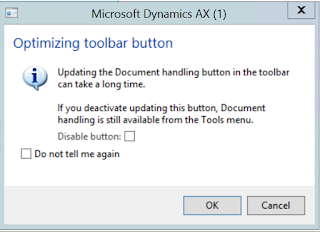
Optimizing toolbar button - Dynamics AX
Image
Usually when a Dynamics AX user starts working with a new instance of Dynamics AX 2012, there might be an annoying message popping up every time the user opens up certain forms. This depends on the Configuration setup done for that AX environment. You could always select "Do not tell me again" checkbox and this won't appear. However, it is maybe much wiser to know what is this dialog intended for. Purpose: The intention of this dialog is to avoid unnecessary performance hit for the user. Solution: If the particular user is not going to use any document management features of AX 2012. Then the best option is to unselect the Document management related checkbox: "Show attachment status" from user options. This is a user-specific setting. So changing this doesn't impact the setting for other users in the same environment. If there is no Document management is setup for the AX environment at all, then the system administer can run scripts to di...

Document management in AX 2012

Image
In Dynamics Ax 2012, you can attach documents to specific records. This can be done by clicking the "Attachments" button on the Ribbon for many forms. Below is a screen capture for Workers form: The picture isn't clear, this is just to give an idea where you should possibly look for Attaments button.   But before you go ahead with Document attachments, you need to setup few things listed below: Activate Document management Set up Archive Directory - place to store the documents Create required Document types Use Document management to attach files to records in any Dynamics Ax Form. Activate Document Management: Complete the following procedure to activate document management. C lick File > Tools > Options .  Click General and then expand the Miscellaneous FastTab.  Select the Document handling active check box.  Select Show attachment status to highlight the Document handling control on the status bar and Selec...