Posts

Showing posts with the label Non-AX

Announcements related to Other apps related to D365Ops

Just thinking out load - With "Dynamics 365 for Finance and Operations" moving towards this "new approach" by Microsoft, it is more and more important to understand the latest announcements. When I say "new standard", I meant the stage where most of the Microsoft products are moving towards. Windows 10 - Seems like no more newer versions, but rather continous updates to keep the same version up to date. Office 365 - is also one such standard. Now Dynamics 365 maybe falls under the same category. Microsoft annouces GA of AppService and Functions on Azure stack: Early this month, Microsoft shared that Azure App service and Functions are generally available on Azure stack, i.e, Customers who intend to use it can go ahead, buy and use the service in their PROD environments. Now customers can deploy their application (be it D365fFO or any other) in the environment of their choice with App Service - the public cloud, Virtual network or on-premises wi...

Mouse pointer disappers on AX Virtual machines (RDP)

Image
Occastionally really minor can bring in lot of frustration in our daily work. One such incident with me was the annoying behaviour of Mouse pointer in the Virtual machines when connected to Remote desktop. Whenever, I hover over a notepad, SQL database query window, Visual studio, I don't see my mouse pointer anymore. The only things I have changed are: Started using High resolution laptop/surface. Started using Microsoft Remote desktop connection manager Upon little investigation, the reason seems to be that the small "|" Text select mouse pointer is almost vanishing when used in High resolution. So in other terms, the mouse pointer shape changes and it exists on the screen - but we don't see it anymore :) Workaround in Windows 8 and above: Right click on the Remote desktop Select Personalize > Click Mouse pointers And in the various cursor options, find "Text Select" and change the mouse pointer shape to a normal mouse pointer. Click ...

What is Cloud. And what are IaaS, PaaS, and SaaS?

Image
The word " Cloud " is getting more heard and used with days passing by. So what actually is a Cloud (or) a Cloud platform (or) Cloud computing (or) Cloud services. Basically these are platform, computing ability, services respectively which are hosted in some part of the world and are accessible over Internet . To understand the best, we can take an example like electricity. In general, You just use electricity as an utility and pay according to the usage. You would seldom have to build, maintain and generate your own electricity - because of the comfort you receive using electricity as an utility. Cloud services can be mapped to the same concept. Cloud computing services can be of three kinds, private , public and hybrid . And they act as the name suggests. Many articles can be found in the internet on the definitions, pros and cons. Three such major cloud service providers are: Microsoft Azure - https://azure.microsoft.com/en-us/   Amazon web services - https:/...

How to identify the SQL Version and SQL Edition

Image
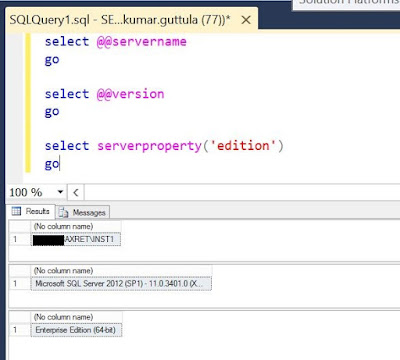
When working on AX implementations, one main purpose of Analysis phase is to identify and estimate the License costs for the Customer. And a major part of the Implementation cost can go into "Purchasing licenses" During such a scenario, I found some helpful information on how to identify the Microsoft SQL Editions. If you want to check the SQL Version and/or SQL Edition of the installed product, you can follow the below simple steps: Connect to the server in which SQL Server is installed. Open SQL Server Management Studio from Programs/Start. Alternatively you can type 'ssms' in Run. Connect to the Database Open a new Query window and paste the below code select @@servername go select @@version go select serverproperty('edition') go Execute the query This will result in Three different output/resultset. The first provides you the "Name of the server", second provides you the "Version of Installed SQL" and the third provides you...

Harddisk full: But don't see any specific file which has grown big?

Image
Occasionally, I ran into this issue in my Virtual machine - that the Harddisk becomes full and I couldn't find any specific huge file like, a over-grown database (.mdf, .ldf) files and neither do I have huge amount of backup files (.bak).   After a little searching, I found about the Windows.edb file has grown exponentially and was taking up all the hard disk space. This file is a result of Windows Search service. Below is the problem statement from one of the Microsoft sites:   Problem statement: In Windows 8 or Windows Server 2012, the Windows Search Service may bloat the Windows.edb file. When this issue occurs, the Windows.edb file grows to a very large size and consumes lots of disk space. In some instances, the file size can be larger than 50 gigabytes (GB).   Resolution: To resolve this issue, install update rollup 2836988 for Windows 8 and Windows Server 2012. For more information about how to obtain this update rollup package, click the following arti...

How to solve if SQL database struck in Restoring state

Image
Sometimes, even during a simple task like Database backup and restore could be tricky because of a strange error. That is how IT works. During one such operation, I have observed that the Database was struck in Restoring state . And no SQL operations were working on the DB with the usual error message: " The database is not accessible for the user " and " The database is currently in use ". If you have a database backup, which most probably you will have if you were trying to restore the database - you can follow the below steps as a solution: Execute the dbcc detachdb (' Your database name ') The observation made here is that, the GUI way to detach the database does not work. However, when you run this command - you will receive an error message when you execute. However the database is dropped which gives you a scope to attach the database again. Now use the database backup with you to restore the database again. Maybe try to use RECOVERY while...

Things to know: Upgrade RAM in your Desktop

Today, I have tried to upgrade RAM on my server and faced some challenges as the server is not recognizing the new RAM, I have added. So I did some googling and found some important and crisp information. So would like to share the same for everyone's convenience.  The below youtube links are all what you need in order to understand what and how you need to do a RAM upgrade in your desktop machine or a laptop.  Introduction to RAM (Memory) - Video link   Features and types of Memory - Video link Upgrading Memory in your Desktop - Video link  Upgrading Memory to Desktop and a Laptop - Video link Like mentioned in the video links, the sites and tools you must use before you make the decision of either buying or upgrading your RAM are:  www.crucial.com   www.cpuid.com   Hope this helps. Good luck. 

How to create Bulk users in Active Directory (AD) using dsadd command

Image
What is Active directory (AD)? Active Directory provides a central location for network administration and security. Server computers that run Active Directory are called domain controllers. An AD domain controller authenticates and authorizes all users and computers in a Windows domain type network In order to create Bulk users in AD using dsmod command, let’s start with basics: 1.       Creation of OU (Organizational Unit) using dsadd 2.      Creation of Group using dsadd 3.      Creation of Single user using dsadd 4.      Script to create Bulk users listed in a text file #1: Creation of OU using dsadd Open command prompt > Run as Administrator Enter the below command: dsadd ou ou=MarketMall,dc=officedump,dc=com where, MarketMall is the name to be given to the new OU created dc=officedump,dc=com à represents the domain “officedump.com” Press Enter t...

Basic understanding of Unix and Linux

What is UNIX? UNIX is an operating system which was first developed in the 1960s, and has been under constant development ever since. By operating system, we mean the suite of programs which make the computer work. It is a stable, multi-user, multi-tasking system for servers, desktops and laptops. UNIX systems also have a graphical user interface (GUI) similar to Microsoft Windows which provides an easy to use environment. However, knowledge of UNIX is required for operations which aren't covered by a graphical program, or for when there is no windows interface available, for example, in a telnet session. The UNIX operating system is made up of three parts: 1.       The kernel: The kernel of UNIX is the hub of the operating system: it allocates time and memory to programs and handles the filestore and communications in response to system calls 2.       The shell: The shell acts as an interface between the use...

About Internet Protocol, IPV4 and IPV6

Image
[NDR – Non Dynamics related Topic] What is Internet Protocol - IP? IP specifies the technical format of packets and the addressing scheme for computers to communicate over a network. It can be compared to something like the postal system. It allows you to address a package and drop it in the system, but there's no direct link between you and the recipient. What is TCP/IP? Most networks combine IP with a higher-level protocol called Transmission Control Protocol (TCP), which establishes a virtual connection between a destination and a source. TCP/IP establishes a connection between two hosts so that they can send messages back and forth for a period of time. There are currently two version of Internet Protocol (IP): IPv4 and a new version IPv6. What is IPv4 -- Internet Protocol Version 4? IPv4 is the fourth revision of the Internet Protocol (IP) used to identify devices on a network through an addressing system. The Internet Protocol is designed for use in interconnected syste...

What are Compiled and Interpreted languages

Image
Compiled and Interpreted languages, When you start with programming, maybe these two words are one of the first things to learn. Usually Programming languages are developed in order to make it easy for the Programmer to write source-code in a easily understandable and readable. And this source-code written by the Programmer has to be converted to Machine Language for the Computers to understand. A programmer can directly write the source-code in Machine language too - however this will take several more time and unnecessary energy from the programmer, so thus the Programming languages. Now, The process of converting the Programmer written source-code to Machine code can be done in two ways: Using a Compiler (Compiled languages)  Using an Interpreter (Interpreted languages) So we need to get our source code converted into machine code somehow before it can run. Now luckily, this is not a big decision you have to worry about. Most languages you'll deal with will naturally ...