Posts

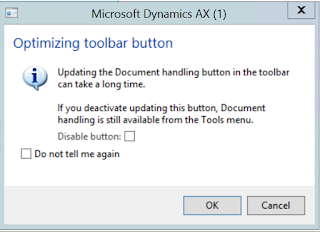
Optimizing toolbar button - Dynamics AX
Image
Usually when a Dynamics AX user starts working with a new instance of Dynamics AX 2012, there might be an annoying message popping up every time the user opens up certain forms. This depends on the Configuration setup done for that AX environment. You could always select "Do not tell me again" checkbox and this won't appear. However, it is maybe much wiser to know what is this dialog intended for. Purpose: The intention of this dialog is to avoid unnecessary performance hit for the user. Solution: If the particular user is not going to use any document management features of AX 2012. Then the best option is to unselect the Document management related checkbox: "Show attachment status" from user options. This is a user-specific setting. So changing this doesn't impact the setting for other users in the same environment. If there is no Document management is setup for the AX environment at all, then the system administer can run scripts to di...

Things to know: Upgrade RAM in your Desktop

Today, I have tried to upgrade RAM on my server and faced some challenges as the server is not recognizing the new RAM, I have added. So I did some googling and found some important and crisp information. So would like to share the same for everyone's convenience.  The below youtube links are all what you need in order to understand what and how you need to do a RAM upgrade in your desktop machine or a laptop.  Introduction to RAM (Memory) - Video link   Features and types of Memory - Video link Upgrading Memory in your Desktop - Video link  Upgrading Memory to Desktop and a Laptop - Video link Like mentioned in the video links, the sites and tools you must use before you make the decision of either buying or upgrading your RAM are:  www.crucial.com   www.cpuid.com   Hope this helps. Good luck. 

What are Containers in AX 2012?

In X++, container is one of the primitive (value) types. A container can contain an ordered sequence of primitive values or other containers. A container can be used as one of the column types that you can select when you add a new column to a table in AOT. Thereby, it can be stored in the database. Container is not a class. Containers can be said to be similar to an arary or List/stack classes. But with Containers you can never change size or content of an existing container. Another interesting thing about containers is that they are immutable. Even though few X++ statements in the System code appear to modify a container, they are actually internally building a new container and copying values as necessary. Even an assignment of a container to another container variable creates a new copy of the container. Because of all this, usage of containers are said to have performance implications. The X++ function conPeek returns an anytype type. The flexibility of anytype makes contain...

Use Temporary Table in AX 2009

Temporary table(Table whose property temporary set to "yes") is not persistent media , so at run-time you have to populate the temporary table and attach the same to the form/report. For illustration purpose ,I am using inventTable data and attaching the items whose group is Parts. Steps 1. Create temporary table as TmpTestTable with 3 fields(ItemId,Itemname,ItemGroup). 2. Create a form as TempTestTable and attach the table as datasource 3. Create a new method on the form and copy the following code TmpTestTable populateRecords(ItemGroupId _itemGroupId) { TmpTestTable tmpTable; InventTable inventTable; ; while select inventTable where inventTable.ItemGroupId == _itemGroupId { tmpTable.Itemid = inventTable.ItemId; tmpTable.ItemName = inventTable.ItemName; tmpTable.Itemgroup = inventTable.ItemGroupId; tmpTable.insert(); } return tmpTable; } 4. Call the above method in init() after super as below public void init() { super(); // Call the setTmpData method to attach rec...

What to do:Error to navigate to the report server, enable remote errors

Today I was working on SSRS report changes and everything went fine in the DEV environment. And the code changes had to be moved to UAT environment. However, even after a successfully deployment of the report, I was getting the below error when I was trying to view report from AX Form. Error message: " For more information about this error navigate to the report server on the local server machine, or enable remote errors " Why do we get this error: Most probably there are two reasons, 1. There is some error in the .net code 2. The IL code is not reflected with the .net code changes made for the report. Suggested solution approach: I have approached the troubleshooting in the below order, 1. Compile the objects 2. Generate Incremental CIL 3. Redeploy the SSRS report. Ideally you should be able to run the report, if the issue was with IL code not reflecting with your code changes. Hope this helps. Good luck! P.S. In case you are not able to resolve the issu...

Ax 2012 SSRS Reporting concepts

Image
The SSRS reporting concepts are very well explained in the below link, you can go through the same for a good understanding of SSRS with Dynamics Ax. Below are few important related points listed and also the Reporting Services Overview slide.  Reporting services overview The picture is self explantory and just to brief things up: Basically a Report Model can contain Reports, Layout Templates, Table Style templates, Report Database etc.. And nodes which we can find under Report/Report Model are Datasets, Desgin, Parameters, Data methods and Images. In Ax terms, a Datasets can be said to be a data source and collection of fields from data source. And basically an Ax Query, SQL Data, OLAP data (cube) and a Data method can act as a Data source for a report Design node of a Report/Report model will contain three major parts, namely, Header, Body and Footer. And the Desgins can be of two types, namely Auto Design and Precision design. Dynamics Ax will take of...

SSRS Ax 2012: How to design reports with builtin templates

Image
We have already created a very simple and basic report. For more details look at the Internal links listed below. And now we are going to make our report look better. And the simplest way to have the reports to have standard look and layout is "to set AutoDesign's several properties" AutoDesign has a property called Layout template , and DataRegion (CustTable) has a property called Style template. By modifying these two properties we can actually have a better look and feel for our report. Layout Template: This can be found under properties for AutoDesign node. When I click the comboBox to see the options avaliable for LayoutTemplate, I see the below and I choose "ReportLayoutStyleTemplateNoCompany". Lets see what changes does it make to my report. The report looks much better now. The Header and the Footer of the template have been automatically designed to somewhat similar to standard Ax reports. Style Template: This can be found under p...