Posts

Basic domain accounts needed for Dynamics AX Installation

In order to run a Microsoft Dynamics AX implementation many services are required. You must create domain accounts to run the services, and each domain account must be a dedicated account (used only for the specific service). Additionally, you must have a password that does not expire, minimal access to network resources, and be able to log on as a service. The following domain accounts to run Microsoft Dynamics AX services Account Description To configure this account... AOS Service Account The domain account or Network Service account the Microsoft Dynamics AX Object Server Windows service will run as. This account is used to communicate with the database server. Consider the following points when you select an account: It is strongly recommend that you use a domain account in a production environment. You should use the Network Service account only in development and testing environments. If the SQL Server and the AOS are on different computers, you must use a domain acc...
Permissions needed to perform AX installation

To start the Microsoft Dynamics AX installation process, you need to speak with the systems administrator to ensure that the account you log on with at each server has appropriate permissions. Also, you must be a member of the Administrators group on the local computer where you are installing a component. The following permissions are implemented according to the principle of least privilege, and the below table lists permissions required in addition to administrator access on the computer. Component Additional permissions required to install Database Member of the dbcreator role on the SQL Server instance. Application Object Server (AOS) Member of the securityadmin role on the SQL Server instance you want to connect to. Enterprise Portal Member of the SYSADMIN role in Microsoft Dynamics AX and a member of the dbcreator role on the SQL Server instance being used for Microsoft SharePoint Services. Enterprise Search Member of the SYSADMIN role in Microsoft Dynamic...

Firewall settings needed for Dynamics AX installation

In case, you use Windows Firewall to protect your computers, for Microsoft Dynamics AX components to function, you must use the settings shown in the below table. For more information about Windows Firewall, refer to the Windows documentation Component Computer Firewall Setting Notes Setup Any Allow outbound HTTP connections To access the documentation that is available from the Setup wizard, you must be able to connect to the Internet from the computer where you are running Setup. Database or Model Store Database Server Exclude the port used by SQL Server ( 1433 by default) For more information, refer to the SQL Server documentation. Application Object Server (AOS) AOS Server Exclude the TCP/IP port used by the AOS ( 2712 by default) Setup automatically creates the inbound rule "Dynamics AX 6.0 -MicrosoftDynamicsAX (RPC)" for the TCP/IP port. Exclude the services WSDL port used by the AOS ( 8101 by default) Setup automatically creates the inbound rule...

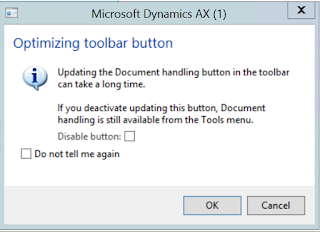
Optimizing toolbar button - Dynamics AX

Image
Usually when a Dynamics AX user starts working with a new instance of Dynamics AX 2012, there might be an annoying message popping up every time the user opens up certain forms. This depends on the Configuration setup done for that AX environment. You could always select "Do not tell me again" checkbox and this won't appear. However, it is maybe much wiser to know what is this dialog intended for. Purpose: The intention of this dialog is to avoid unnecessary performance hit for the user. Solution: If the particular user is not going to use any document management features of AX 2012. Then the best option is to unselect the Document management related checkbox: "Show attachment status" from user options. This is a user-specific setting. So changing this doesn't impact the setting for other users in the same environment. If there is no Document management is setup for the AX environment at all, then the system administer can run scripts to di...

Things to know: Upgrade RAM in your Desktop

Today, I have tried to upgrade RAM on my server and faced some challenges as the server is not recognizing the new RAM, I have added. So I did some googling and found some important and crisp information. So would like to share the same for everyone's convenience.  The below youtube links are all what you need in order to understand what and how you need to do a RAM upgrade in your desktop machine or a laptop.  Introduction to RAM (Memory) - Video link   Features and types of Memory - Video link Upgrading Memory in your Desktop - Video link  Upgrading Memory to Desktop and a Laptop - Video link Like mentioned in the video links, the sites and tools you must use before you make the decision of either buying or upgrading your RAM are:  www.crucial.com   www.cpuid.com   Hope this helps. Good luck. 

What are Containers in AX 2012?

In X++, container is one of the primitive (value) types. A container can contain an ordered sequence of primitive values or other containers. A container can be used as one of the column types that you can select when you add a new column to a table in AOT. Thereby, it can be stored in the database. Container is not a class. Containers can be said to be similar to an arary or List/stack classes. But with Containers you can never change size or content of an existing container. Another interesting thing about containers is that they are immutable. Even though few X++ statements in the System code appear to modify a container, they are actually internally building a new container and copying values as necessary. Even an assignment of a container to another container variable creates a new copy of the container. Because of all this, usage of containers are said to have performance implications. The X++ function conPeek returns an anytype type. The flexibility of anytype makes contain...

Use Temporary Table in AX 2009

Temporary table(Table whose property temporary set to "yes") is not persistent media , so at run-time you have to populate the temporary table and attach the same to the form/report. For illustration purpose ,I am using inventTable data and attaching the items whose group is Parts. Steps 1. Create temporary table as TmpTestTable with 3 fields(ItemId,Itemname,ItemGroup). 2. Create a form as TempTestTable and attach the table as datasource 3. Create a new method on the form and copy the following code TmpTestTable populateRecords(ItemGroupId _itemGroupId) { TmpTestTable tmpTable; InventTable inventTable; ; while select inventTable where inventTable.ItemGroupId == _itemGroupId { tmpTable.Itemid = inventTable.ItemId; tmpTable.ItemName = inventTable.ItemName; tmpTable.Itemgroup = inventTable.ItemGroupId; tmpTable.insert(); } return tmpTable; } 4. Call the above method in init() after super as below public void init() { super(); // Call the setTmpData method to attach rec...