Posts

Here we have information about AX7 / AX2015 / Rainier!

Image
AX7 / AX2015 / Rainier, we have heard many names for the upcoming and much awaited Microsoft Dynamics AX Product. Seems like Microsoft has settled with the name AX7 now. While looking out for information about AX7, I have bumped into this Microsoft Convergence Video: http://convergence.evo-td.com/library/CS15A000   . Although the site demands you to login, I think it is pretty easy to register. Check it out! Microsoft aims to release this product by End of 2015 and has clearly stated the Guiding principles for AX 7.0. To Empower every person and every organization on the planet to achieve more To create more personal computing To Reinvent productivity and business processes To Build the intelligent cloud Below is some key information on AX Functionality enhancements from the above roadmap session. Productivity: Modern, web-based user experience based on HTML5 technology. The client is device-independent and has a panorama view / dashboard and next ge...

Cumulative update 9 (CU9) for AX 2012 R3

Microsoft has recently released Cumulative update 9 (CU9) for Microsoft Dynamics AX 2012 R3 very recently and here some information around it. The Knowledge base (KB) article number is 3063879 and the Build number after installation would be 6.3.2000.326. There is lot of information on TechNet – here is the link . CU9 is the second Cumulative Update for Dynamics AX 2012 R3 after CU8 . It only applies to R3 at this moment. However Microsoft has made the Cumulative Update 8 for Dynamics AX 2012 R2.   There by enabling users of AX R2 customers to directly upgrade to AX7 in the near future. In addition to containing several hotfixes that have been recently released, CU9 also includes new features across several different module sets. The details on the new features can be found in the above TechNet article link - do look to the bottom of the page of the “What’s New” link to see the content that’s specific to CU9. Starting with Dynamics AX 2012 R3, you can now slips...

Harddisk full: But don't see any specific file which has grown big?

Image
Occasionally, I ran into this issue in my Virtual machine - that the Harddisk becomes full and I couldn't find any specific huge file like, a over-grown database (.mdf, .ldf) files and neither do I have huge amount of backup files (.bak).   After a little searching, I found about the Windows.edb file has grown exponentially and was taking up all the hard disk space. This file is a result of Windows Search service. Below is the problem statement from one of the Microsoft sites:   Problem statement: In Windows 8 or Windows Server 2012, the Windows Search Service may bloat the Windows.edb file. When this issue occurs, the Windows.edb file grows to a very large size and consumes lots of disk space. In some instances, the file size can be larger than 50 gigabytes (GB).   Resolution: To resolve this issue, install update rollup 2836988 for Windows 8 and Windows Server 2012. For more information about how to obtain this update rollup package, click the following arti...

How to Fix Reporting services in Microsoft Demo VM

Image
Microsoft Demo VMs are really useful if you are aiming to quickly understand a particular AX component or even to quickly go ahead with a specific development. However, it comes with default settings and thus might cause some issues regarding few components around AX. Today, I have seen such issue with Reporting Services  in my AX 2012 R3 Microsoft demo VM.  Error received when I click "Create report folder" in "Report Servers" AX form.  The report server installation is not initialized Also when I checked in the EventLog, the below errors were logged.  Report Server (MSSQLSERVER) cannot connect to the report server database. & Web service request FindItems to Report Server http://bakedev02-1-1/reportserver/ReportService2010.asmx failed with SoapException. Error: The report server installation is not initialized. When I check the "Reporting Services Configuration Manager", everything looks normal. However, I could NOT successfully load the ...

How to Fix EP in Microsoft Demo VM environments

It is quite often that you will run into issues trying to open Enterprise portal (EP) in Microsoft released DEMO VM environments. This is basically because of the change in IP addresses and also depends on which host the VM is installed (Hyper-V or Oracle Box or VMWare). The same happened to me and I have found posts by several helpful AX Tech people. Below are two such related links.  Here's how you can fix it. (intranet.contoso.com) (VMWare player):  Link EP is not working In AX 2012 R3 VM: Link How to use Set IP Utility: Link  (Needs PartnerSource access) However, My personal suggestion to you is to reinstall EP after you have setup your VM in order to have better results. Of course, this requires that you have the Setup file for the respective AX Version. Steps to follow: Download/collect setup file of the necessary AX Version (like AX 2012 R2 or AX 2012 R3..) Copy the setup files to the VM (or) use a Shared folder from your host Run as Administrato...

How to solve if SQL database struck in Restoring state

Image
Sometimes, even during a simple task like Database backup and restore could be tricky because of a strange error. That is how IT works. During one such operation, I have observed that the Database was struck in Restoring state . And no SQL operations were working on the DB with the usual error message: " The database is not accessible for the user " and " The database is currently in use ". If you have a database backup, which most probably you will have if you were trying to restore the database - you can follow the below steps as a solution: Execute the dbcc detachdb (' Your database name ') The observation made here is that, the GUI way to detach the database does not work. However, when you run this command - you will receive an error message when you execute. However the database is dropped which gives you a scope to attach the database again. Now use the database backup with you to restore the database again. Maybe try to use RECOVERY while...

Issues with Deleting Dynamics AX In Bound port

Image
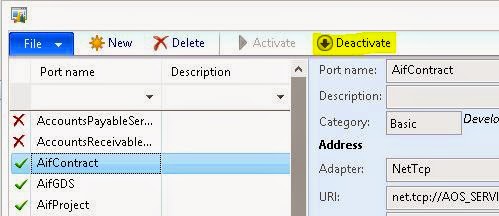
First thing to note is to delete a Dynamics AX In-Bound port, you must ensure that the port is Deactive. In case you try to delete an Active port, you will get an error message similar to below. The port 'InBound port name' must be undeployed before it can be deleted. Just click button Deactivate after selecting the port you want to delete. Path: System administration > Setup > Services and Application Integration Framework > Inbound ports Another issue which you might have encountered while trying to delete an InBound port is the error message – “Port cannot be deleted while dependent Gateway queue exist. Delete dependent Gateway queue and try again.” This happens when you have dependent records in Queue manager. The solution is to go to Queue manager and delete all the records which are using the port you want to delete. Path: System administration > Periodic > Services and Application Integration Framework > Queue manager