Posts

Error: ProcessTargetRequestHeader failed in AX Retail:Download Session

Image
Dynamics AX Retail has an intense Architecture behind the scenes, so some issues could take much more time to troubleshoot and fix the problem. So I am just writing down about this issue I faced today working with AX Retail Channel Integration.  When trying to perform a Full sync  for the Job-1070  for a Channel data Group, I encountered the below error.  Microsoft.Dynamics.Retail.StoreConnect.Request.SQLHandler.ProcessTargetRequestHeaderException: ProcessTargetRequestHeader failed to execute all delete requests ---> Microsoft.Dynamics.Retail.StoreConnect.Request.SQLHandler.ProcessDeleteRequestException: Delete request on table:[ax].[ACCOUNTANT_BR] failed to execute. ---> Microsoft.Dynamics.Retail.StoreConnect.Request.SQLHandler.RunException: Query: DELETE FROM [ax].[ACCOUNTANT_BR] ;; filterNameList: ;filterValueList: ; ---> System.Data.SqlClient.SqlException: The EXECUTE permission was denied on the object 'xp_cmdshell', database 'mssqlsystemresource',...

AX Retail - Basic setup to get started

Image
In this post, the focus will be on some basic setup which needs to be understood and implemented for having a functional AX Retail. Assuming that you have already installed the necessary AX Retail components beforehand. If not, Please go through the below links, which you can find already on Internet (no need for any Partner permissions) A nice Youtube video explaining Retail Topology - See here Also you can find the Microsoft's Retail Deployment Guide - PDF here So now let's focus on what all steps you have to take, settings which you have to configure at the AX Retail HeadQuater level in order to have a functional AX Retail. Kindly note that I am us   Configure and Validate Retail Headquarter settings: Initialize Base configuration for AX Retail Verify Stores Publish channels Retail store management and security Hardware profiles Configure Commerce Data Exchange (CDX) Verify Retail server configuration Check Infolog's generated for more information R...

How to identify the SQL Version and SQL Edition

Image
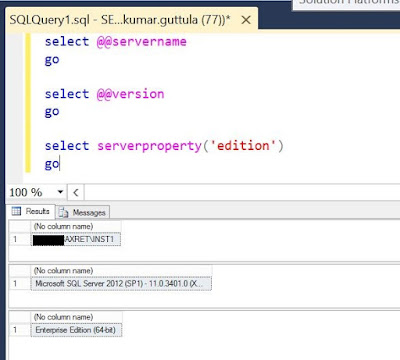
When working on AX implementations, one main purpose of Analysis phase is to identify and estimate the License costs for the Customer. And a major part of the Implementation cost can go into "Purchasing licenses" During such a scenario, I found some helpful information on how to identify the Microsoft SQL Editions. If you want to check the SQL Version and/or SQL Edition of the installed product, you can follow the below simple steps: Connect to the server in which SQL Server is installed. Open SQL Server Management Studio from Programs/Start. Alternatively you can type 'ssms' in Run. Connect to the Database Open a new Query window and paste the below code select @@servername go select @@version go select serverproperty('edition') go Execute the query This will result in Three different output/resultset. The first provides you the "Name of the server", second provides you the "Version of Installed SQL" and the third provides you...

Retail understanding and AX Retail

Image
Clearly, we can see focus shift in the Microsoft product (Dynamics AX) towards Retail industry. In this post, I will try to put forward the understanding of Retail industry and map how Dynamics AX is placed in order to support Retail. What is "Retail"? Retail is the sale of goods to the public in relatively small quantities for use or consumption rather than for resale. Or we can also say, It is the process of selling consumer goods and/or services to customers through multiple channels of distribution to earn a profit. According to Wiki , the top ten Retailers are as below. Maybe this helps in understanding what is a Retail industry is all about. Worldwide Top Ten Retailers Rank Company Country of Origin 1 Walmart  United States 2 Tesco  United Kingdom 3 Costco  United States 4 Carrefour  France 5 Kroger  United States 6 Amazon.com  United States ...

Data partition in AX 2012 and why?

Image
Why? - Data partitioning enables us to logically separate all the business data (very few System data, like batch framework and AIF data are shared). With partitions we achieve the isolation of business data, partition specific, with in the same installation of Microsoft Dynamics AX. The business data can be still shared among companies/legal entities that are in the same partition. Microsoft Dynamics AX displays the partition key in the title bar of the client application. Quick Tip: If utilized properly, partitions can help use maintain two systems, for example, test and UAT in the same environment. We can create one partition for Test and another for UAT and provide access only to the Super users / Customers. This will help in utilizing the System resources more effectively and reduce unnecessary hardware costs. Pros and Cons to have Partitions in Production environments: For a production environment, if the Customer demands to completely isolate the data bet...

Error 1001: During install of Dynamics AX components

Image
Hello everyone..  Very rarely you might encounter an issue during installation of an AX component/AOS, where you typically get just an error message: "Error 1001" and nothing else.  Reason: This is a generic issue, which seems to be caused with an improper uninstall. And the reason behind the scenes is that the corresponding registry entries are still present in the "CurrentControlSet" in Registry, even after you have uninstalled the components.  Solution: There could be many ways to clean the Registry entries (regedit). However, my suggestion is to use the tool provided by Microsoft for resolving such issues.  Link -  https://support.microsoft.com/en-us/help/17588/fix-problems-that-block-programs-from-being-installed-or-removed You can download and follow the steps provided by Microsoft to fix the wrong entries in registry and should be able to continue in your next install attempt.  

Here we have information about AX7 / AX2015 / Rainier!

Image
AX7 / AX2015 / Rainier, we have heard many names for the upcoming and much awaited Microsoft Dynamics AX Product. Seems like Microsoft has settled with the name AX7 now. While looking out for information about AX7, I have bumped into this Microsoft Convergence Video: http://convergence.evo-td.com/library/CS15A000   . Although the site demands you to login, I think it is pretty easy to register. Check it out! Microsoft aims to release this product by End of 2015 and has clearly stated the Guiding principles for AX 7.0. To Empower every person and every organization on the planet to achieve more To create more personal computing To Reinvent productivity and business processes To Build the intelligent cloud Below is some key information on AX Functionality enhancements from the above roadmap session. Productivity: Modern, web-based user experience based on HTML5 technology. The client is device-independent and has a panorama view / dashboard and next ge...